ATS-friendly resume guide
How to make a resume ATS friendly
An ATS-friendly resume is clear enough for software to parse and relevant enough for a person to understand. You do not need tricks. You need readable structure, accurate language, and evidence matched to the role.
An ATS-friendly resume uses conventional structure, readable text, relevant job language, and a supported file format. It also makes your strongest evidence for the target role easy to find. No format or keyword tactic can compensate for missing essential experience, and no public checker can guarantee how a particular employer will configure its systems.
What is an applicant tracking system?
An applicant tracking system, usually shortened to ATS, helps employers receive, organise, search, and manage applications. Different employers use different products and workflows. Some may search or filter applications using criteria connected to the role; others use the system mainly to manage candidates and hiring stages.
That variation matters. There is no universal ATS score and no single secret formula that works everywhere. Your goal is to create a resume that can be interpreted reliably and communicates your fit clearly.
1. Use a clear, conventional structure
Use section headings that require no interpretation. Common examples include:
- Professional Summary
- Skills
- Professional Experience
- Education
- Certifications
- Selected Projects, where relevant
Place information in a logical reading order. Use a simple hierarchy for job title, employer, location, and dates. Avoid relying on colour, icons, or visual placement alone to communicate essential facts.
2. Keep essential text easy to parse
Readable does not have to mean visually dull. It means the document's meaning survives when the text is extracted. Sensible precautions include:
- Use standard fonts and comfortable text sizes.
- Keep headings and dates consistent.
- Avoid putting critical contact details or experience only inside decorative graphics.
- Use actual text rather than screenshots of text.
- Be cautious with complex tables, multiple narrow columns, and unusual reading orders.
- Export the file, reopen it, and confirm the text can be selected and read in sequence.
3. Tailor the resume to the specific role
A resume can be perfectly parsed and still be a weak match. Compare it with the full job description and identify the employer's main outcomes, essential capabilities, domain terms, and preferred experience.
Then bring forward the achievements and responsibilities that demonstrate those priorities. Our step-by-step resume tailoring guide explains this evidence-mapping process in detail.
4. Use relevant keywords naturally
Keywords are useful when they name something real: a platform you used, a qualification you hold, a method you applied, a responsibility you performed, or a domain you understand.
If a job description asks for "clinical trial operations" and your resume says only "research support," a more precise description may reveal relevant experience. But the phrase should appear in a sentence that explains what you actually did.
Keyword alignment is strongest when the keyword is attached to evidence, not repeated in isolation.
Do not add invisible text, paste a list of every phrase from the advertisement, or claim skills you cannot discuss in an interview. Those tactics sacrifice trust for a score that may not represent the employer's process.
5. Make achievements specific
Recruiters and hiring managers need more than a list of duties. Where possible, show:
- the problem or objective;
- the action you took;
- the people, scale, system, or constraint involved; and
- the result, decision, improvement, or risk reduction.
Metrics are valuable when reliable, but specificity can also come from scope, frequency, complexity, audience, regulatory context, or the consequence of the work.
6. Follow the employer's file instructions
Use the file type requested in the application. If the employer accepts more than one format, make sure your chosen export preserves readable text and a stable layout. Use a clear filename such as FirstName-LastName-Role-Resume.pdf unless the employer specifies otherwise.
National Careers Week publishes an Australian ATS-compliant resume information sheet with additional practical formatting reminders.
7. Check the extracted text yourself
Before uploading the resume:
- Open the exported document and select all text.
- Copy it into a plain-text editor.
- Check whether headings, job titles, dates, and bullet points appear in a sensible order.
- Look for missing characters, merged words, or information read in the wrong sequence.
- Correct the source document and export it again if necessary.
This simple check will not reproduce an ATS, but it can reveal obvious problems with text extraction.
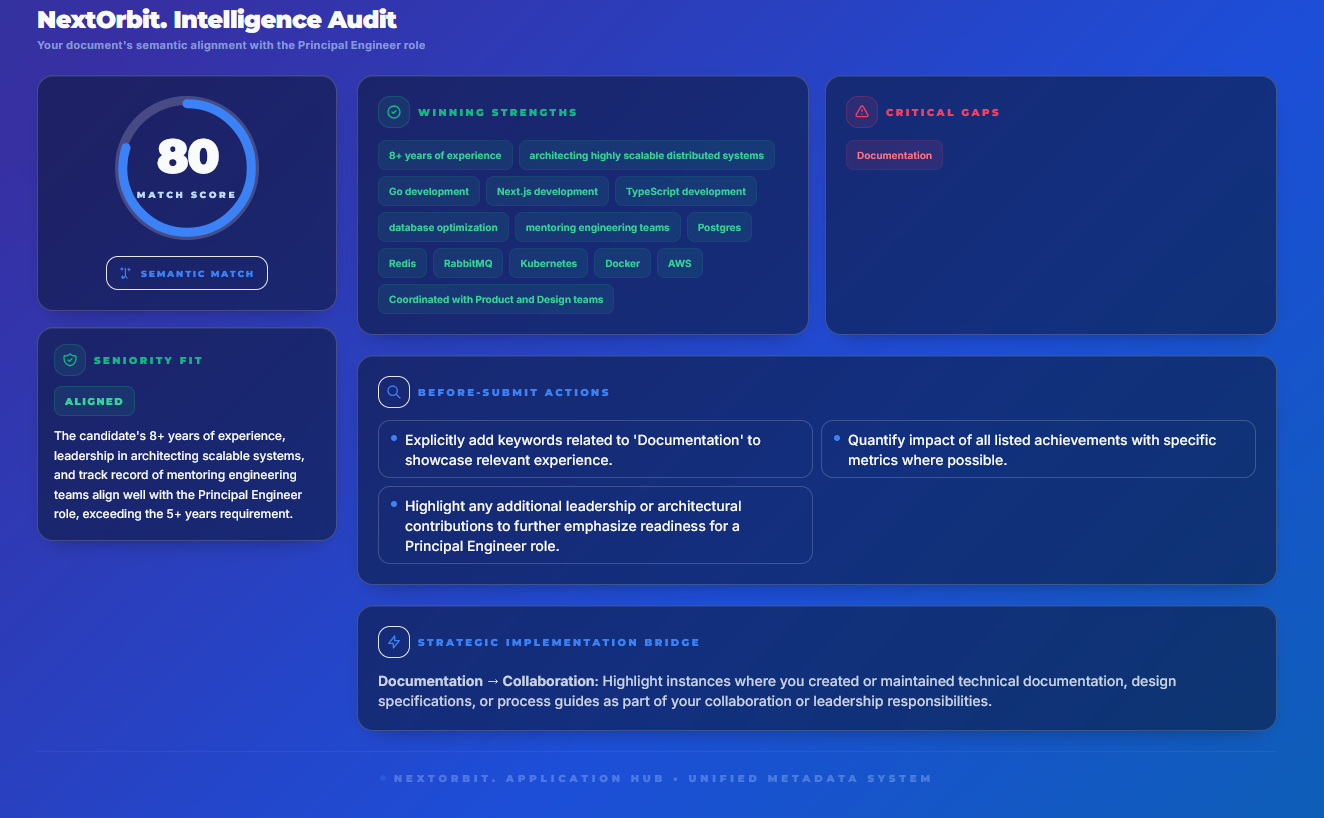
Common ATS resume myths
Myth: A high public score guarantees an interview
A checker does not know the employer's private configuration, applicant pool, internal candidates, or hiring judgement. Treat it as a diagnostic aid.
Myth: Every keyword should appear multiple times
Repetition without evidence can make writing less readable. Aim for accurate coverage and clear examples.
Myth: Creative design is always rejected
The risk depends on the document and system. The practical standard is whether important text can be extracted and understood in the intended order.
Myth: ATS optimisation means writing only for software
A person still needs to evaluate the application. Clear language, relevant achievements, and honest evidence serve both audiences.
ATS-friendly resume checklist
- Clear headings and logical reading order
- Readable text with consistent dates and titles
- Important contact and experience details stored as text
- Role-relevant skills and terminology used accurately
- Achievements supported by specific evidence
- No hidden keywords or unsupported claims
- Requested file type and sensible filename
- Export checked for readable, selectable text
- Final spelling, accuracy, and human review completed
Review the right document
Check your resume against the exact job description
NextOrbit keeps the role, resume, ATS-style review, tailoring notes, and final submitted version connected.